全栈学习
Springboot+MyBatisPlus+Vue
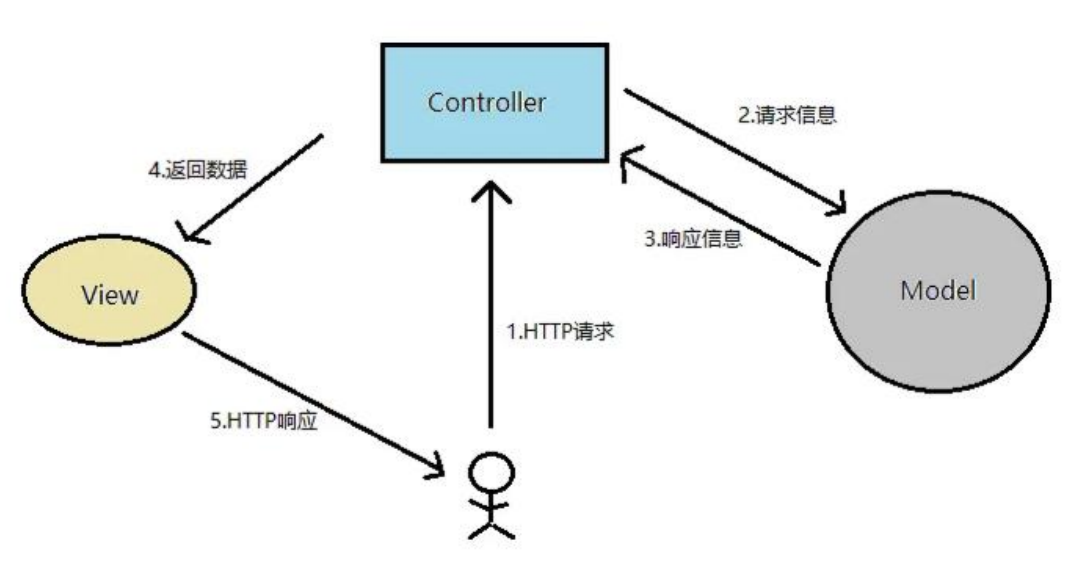
MVC模式
Model+View+Controller
Model是模型层,用于数据的持久化存储;View是视图层,用户呈现数据;Controller是控制器层,用于接收用户的请求并进行相应的操作。
代码格式
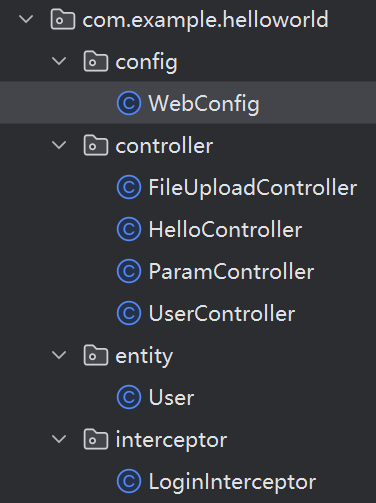
Java代码需要给每个角色分配一个包,包内的命名格式为:实体+包名
控制器(Controller)
直接在类上加@RestController注解
接收请求可以用@RequestMapping注解,一般的GET请求格式如下:
1
| @RequestMapping(value = "user", method = RequestMethod.GET)
|
参数传递时保持一致就行,如果不一致就在参数前添加注解:
1
| @RequestParam(value = "nickname", required = false)
|
静态资源访问
将资源放在static目录下,在application.properties中添加过滤规则和静态资源路径

随后用url就可以访问,也可以配置虚拟路径。
文件上传
POST请求,将客户端传过来的文件存储在服务器的本地
添加配置,设定文件大小
1
2
| spring.servlet.multipart.max-file-size=10MB
spring.servlet.multipart.max-request-size=10MB
|
添加FileUploadController
1
2
3
4
5
6
7
8
9
10
11
12
13
14
15
16
17
18
19
20
21
22
23
24
25
26
27
| @RestController
public class FileUploadController {
@RequestMapping(value = "/upload", method = RequestMethod.POST)
public String up(String nickname, MultipartFile photo, HttpServletRequest request) throws IOException {
System.out.println(nickname);
System.out.println(photo.getOriginalFilename());
System.out.println(photo.getContentType());
String path = request.getServletContext().getRealPath("/upload/");
System.out.println(path);
saveFile(photo, path);
return "上传成功";
}
public void saveFile(MultipartFile photo, String path) throws IOException {
File dir = new File(path);
if (!dir.exists()) {
dir.mkdir();
}
File file = new File(path + photo.getOriginalFilename());
photo.transferTo(file);
}
}
|
拦截器(Interceptor)
用于权限检查、性能监控等,可以直接放入项目代码
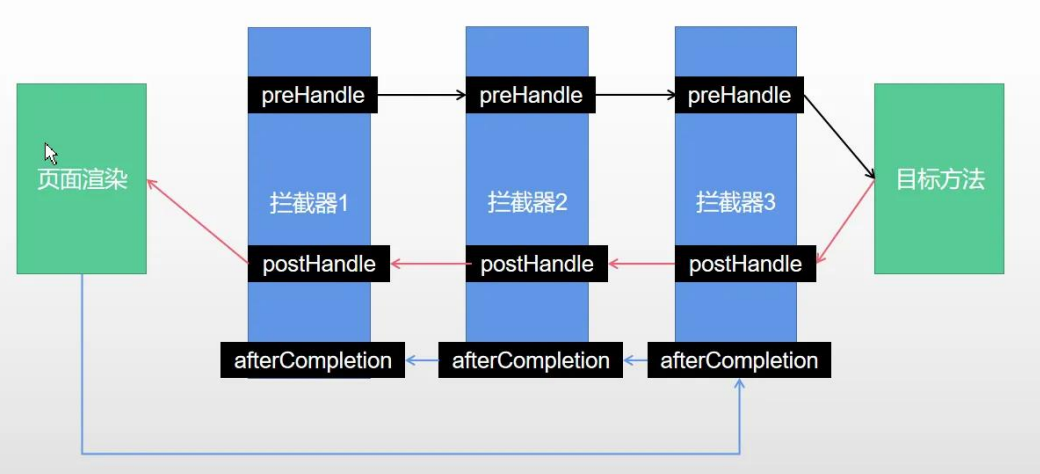
需要实现HandlerInterceptor接口并重写其中的preHandle、postHandle、afterCompletion方法,其中preHandle比较常用
1
2
3
4
5
6
7
| public class LoginInterceptor implements HandlerInterceptor {
@Override
public boolean preHandle(HttpServletRequest request, HttpServletResponse response, Object handler) throws Exception {
System.out.println("LoginInterceptor");
return true;
}
}
|
随后需要在WebConfig中进行拦截器的注册
1
2
3
4
5
6
7
| @Configuration
public class WebConfig implements WebMvcConfigurer {
@Override
public void addInterceptors(InterceptorRegistry registry) {
registry.addInterceptor(new LoginInterceptor()).addPathPatterns("/**");
}
}
|
生成API(Swagger)
用于快速生成API文档,以下代码能够直接放在项目中
在pom.xml中添加依赖。注意Springboot的版本不能超过3,否则会出问题
1
2
3
4
5
6
7
8
9
10
11
12
13
|
<dependency>
<groupId>io.springfox</groupId>
<artifactId>springfox-swagger2</artifactId>
<version>2.9.2</version>
</dependency>
<dependency>
<groupId>io.springfox</groupId>
<artifactId>springfox-swagger-ui</artifactId>
<version>2.9.2</version>
</dependency>
|
添加Swagger2Config
1
2
3
4
5
6
7
8
9
10
11
12
13
14
15
16
17
18
19
20
21
22
23
24
25
| @Configuration
@EnableSwagger2
public class Swagger2Config {
@Bean
public Docket createRestApi() {
return new Docket(DocumentationType.SWAGGER_2)
.apiInfo(apiInfo())
.select()
.apis(RequestHandlerSelectors.basePackage("com"))
.paths(PathSelectors.any()).build();
}
private ApiInfo apiInfo() {
return new ApiInfoBuilder()
.title("演示项目API")
.description("学习Swagger2的演示项目")
.build();
}
}
|
运行后直接访问http://localhost:8080/swagger-ui.html#/即可
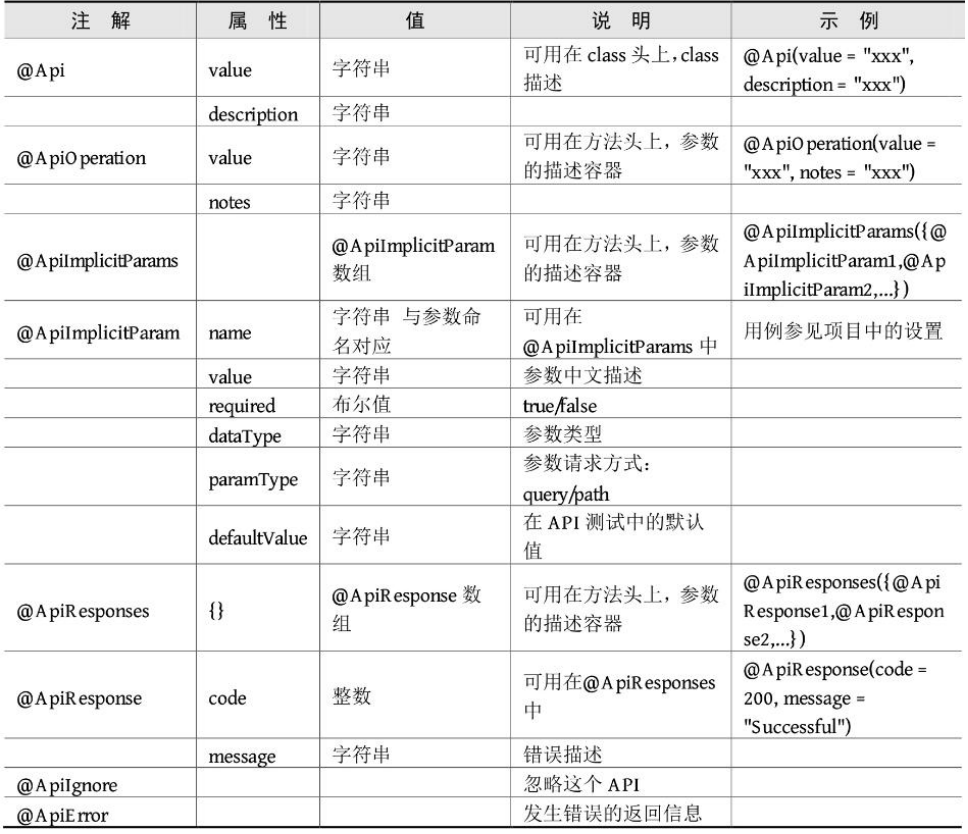
常用注解:
MyBatisPlus
用于操作数据库,是MyBatis的增强版
1
2
3
4
5
6
7
8
9
10
11
12
13
14
15
16
17
18
19
20
|
<dependency>
<groupId>mysql</groupId>
<artifactId>mysql-connector-java</artifactId>
<version>5.1.47</version>
</dependency>
<dependency>
<groupId>com.baomidou</groupId>
<artifactId>mybatis-plus-boot-starter</artifactId>
<version>3.4.2</version>
</dependency>
<dependency>
<groupId>com.alibaba</groupId>
<artifactId>druid-spring-boot-starter</artifactId>
<version>1.1.20</version>
</dependency>
|
添加配置
1
2
3
4
5
6
| spring.datasource.type=com.alibaba.druid.pool.DruidDataSource
spring.datasource.driver-class-name=com.mysql.jdbc.Driver
spring.datasource.url=jdbc:mysql://localhost:3306/mydb?userSSL=false&useUnicode=true&characterEncoding=utf8
spring.datasource.username=root
spring.datasource.password=YOUR_PASSWORD
mybatis-plus.configuration.log-impl=org.apache.ibatis.logging.stdout.StdOutImpl
|
数据库的增删改查操作放在mapper包里面,定义的都是接口类
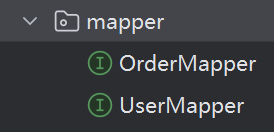
有两种选择:
- 自己写SQL语句
- 继承BaseMapper<T>,T表示要操作的实体,随后用MyBatisPlus写好的SQL语句
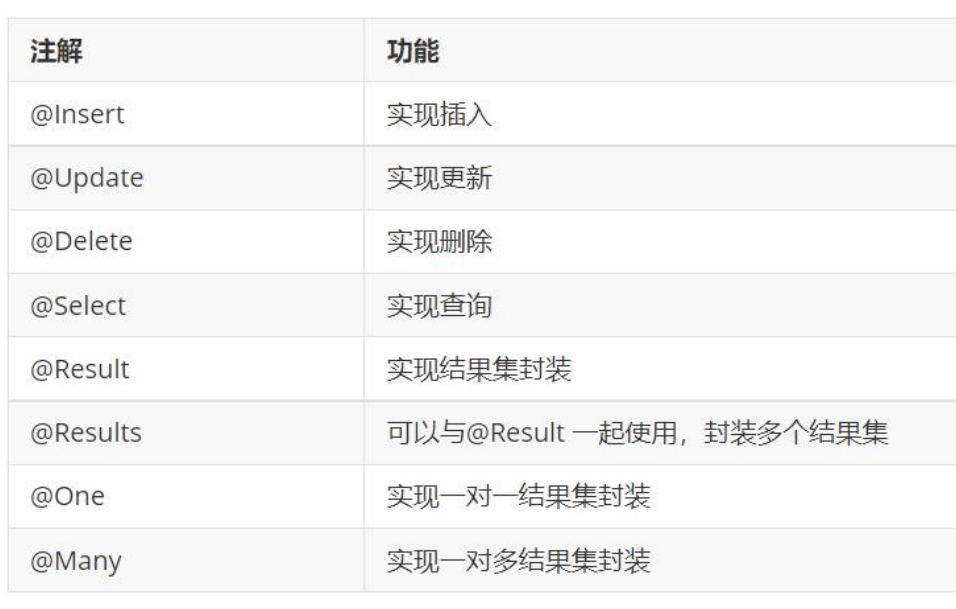
MyBatis一些自带的注解:
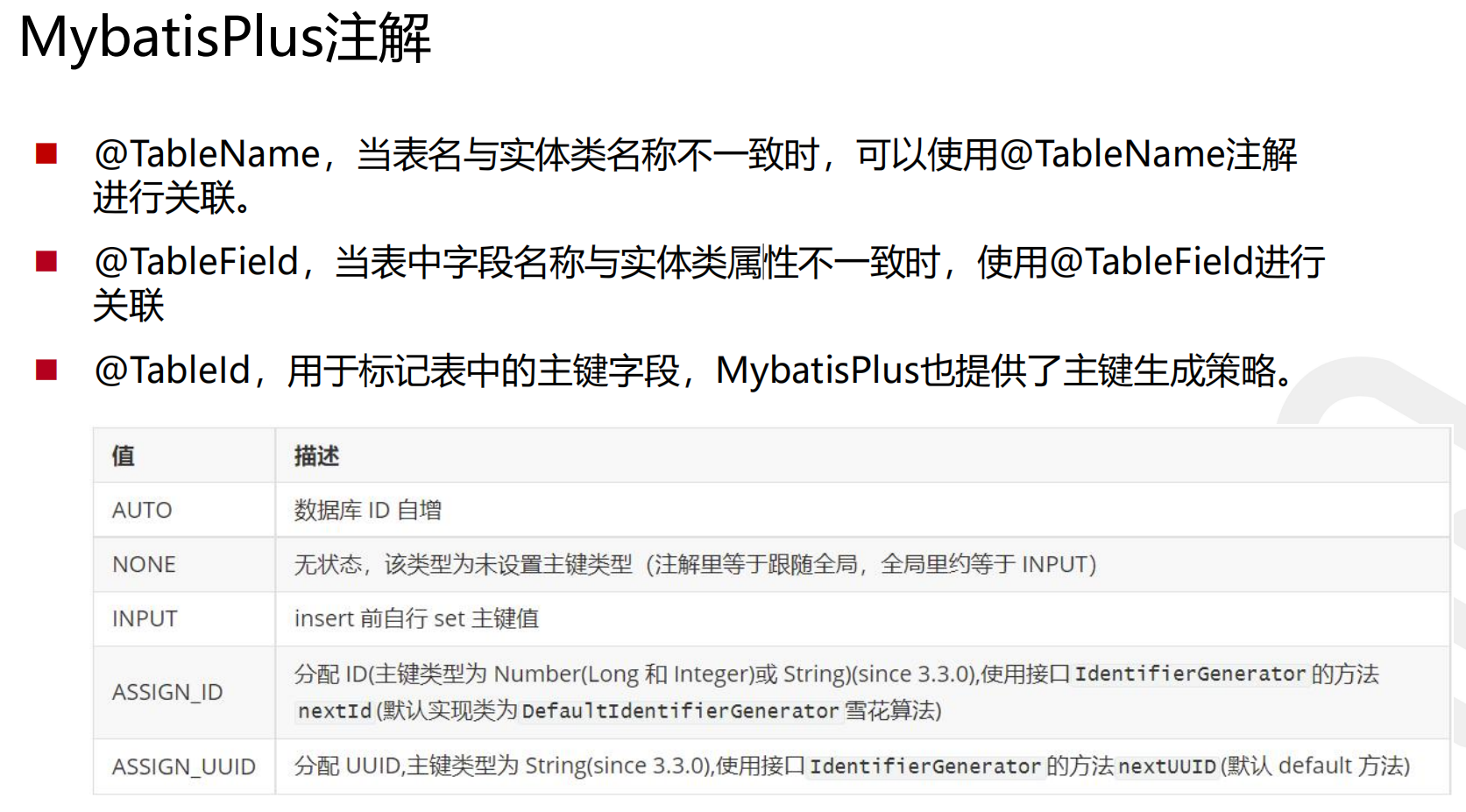
单表查询示例:
1
2
| @Select("select * from t_user where id = #{id}")
public List<User> selectById(int id);
|
多表查询:
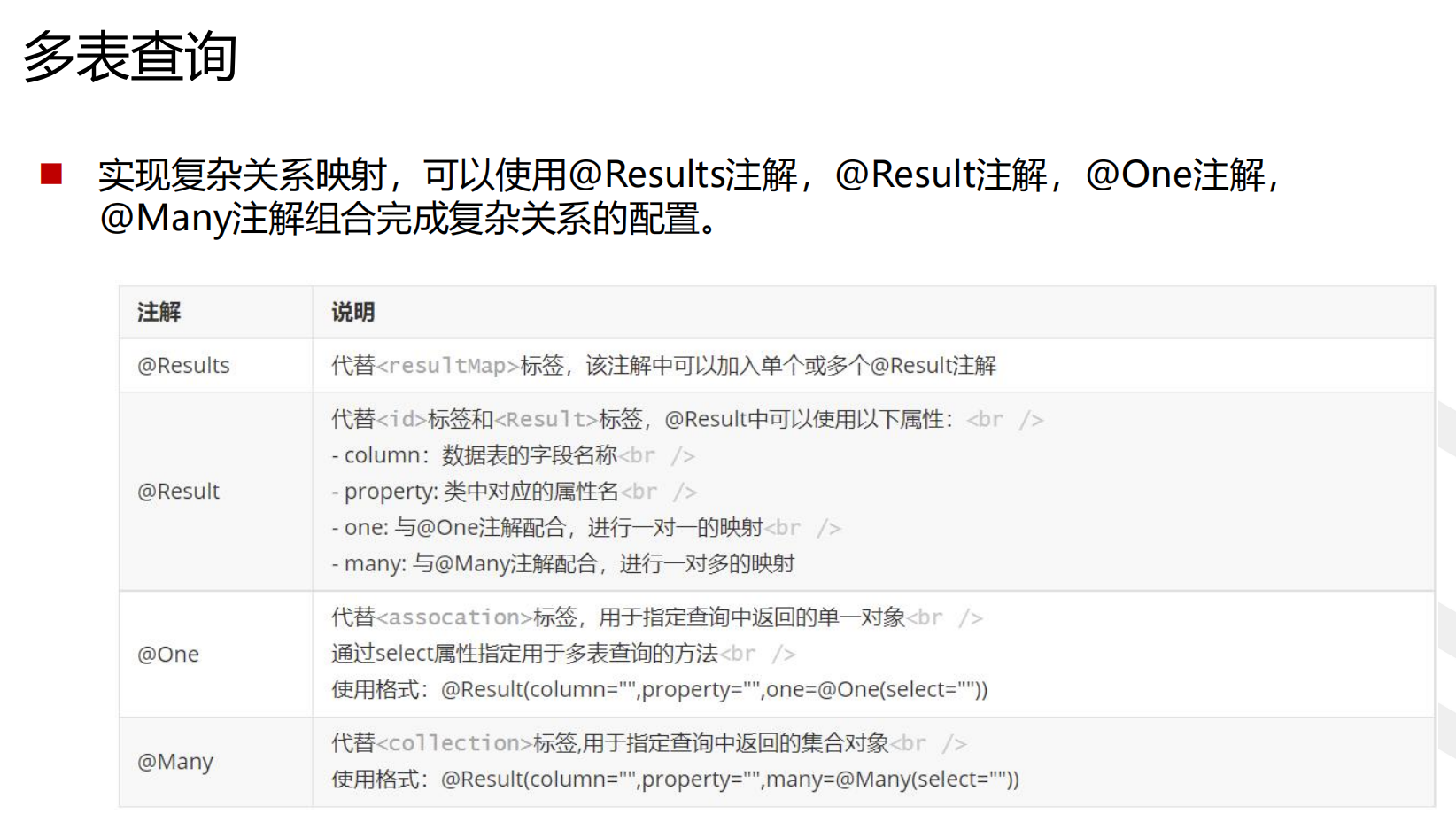
多表查询示例:
1
2
3
4
5
6
7
8
9
10
11
12
13
14
|
@Select("select * from t_user")
@Results(
{
@Result(column = "id", property = "id"),
@Result(column = "username", property = "username"),
@Result(column = "password", property = "password"),
@Result(column = "birthday", property = "birthday"),
@Result(column = "id", property = "orders", javaType = List.class,
many = @Many(select = "com.example.mpdemo.mapper.OrderMapper.selectByUid")
)
}
)
List<User> selectAllUserAndOrders();
|
1
2
3
4
5
6
7
8
9
10
11
12
13
14
|
@Select("select * from t_order")
@Results(
{
@Result(column = "id", property = "id"),
@Result(column = "orderTime", property = "orderTime"),
@Result(column = "total", property = "total"),
@Result(column = "uid", property = "user", javaType = User.class,
one = @One(select = "com.example.mpdemo.mapper.UserMapper.selectById")
)
}
)
List<Order> selectAllOrdersAndUser();
|
分页查询,用Page指定:
添加MyBatisPlusConfig,添加拦截器
1
2
3
4
5
6
7
8
9
10
| @Configuration
public class MyBatisPlusConfig {
@Bean
public MybatisPlusInterceptor paginationInterceptor() {
MybatisPlusInterceptor interceptor = new MybatisPlusInterceptor();
PaginationInnerInterceptor paginationInnerInterceptor = new PaginationInnerInterceptor(DbType.MYSQL);
interceptor.addInnerInterceptor(paginationInnerInterceptor);
return interceptor;
}
}
|
1
2
3
4
5
6
7
8
|
@GetMapping("/user/findByPage")
public IPage findByPage() {
Page<User> page = new Page<>(0, 3);
IPage<User> userIPage = userMapper.selectPage(page, null);
return userIPage;
}
|
条件查询,用queryWrapper指定
1
2
3
4
5
6
7
|
@GetMapping("/user/find")
public List<User> findByCond() {
QueryWrapper<User> queryWrapper = new QueryWrapper<>();
queryWrapper.eq("username", "keikei");
return userMapper.selectList(queryWrapper);
}
|
更新、删除、修改等操作有对应的Mapping类型

 微信
微信 支付宝
支付宝